
New delhi date. November 22, 2019, Friday
The Indian Army has issued an advisory on WhatsApp for all its personnel. The advisory states that all jawans immediately change their WhatsApp account settings so that no Pakistani spy can add you to any group. The army has issued a reference to a recent incident in which an Indian Army jawan's WhatsApp group was edited without permission.

This setting has to be done in WhatsApp account
After the new update, no group admin will add you to the group without your permission. You will need to do some setting for this. For that you first have to update WhatsApp. Then follow this step after opening the app.
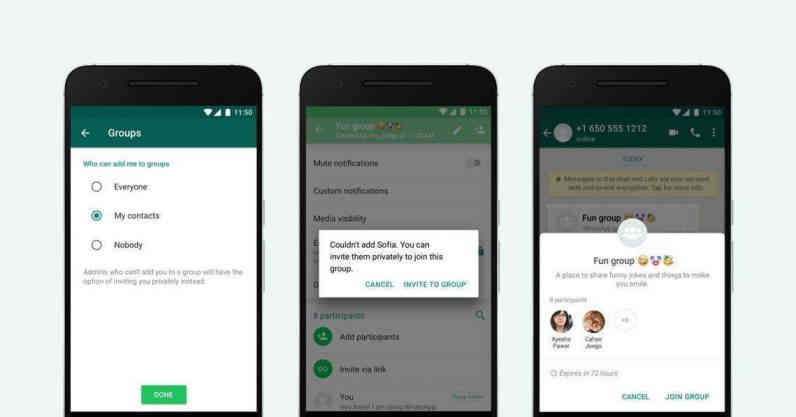
Account> Privacy> Groups Then you have three options: Nobody, My Contacts and everyone involved. If you select the Nobody option, you cannot add a group without your permission. If you want only those people to add you to a group that is in your contact list, then you need to select the My Contacts option.
Indian Army issues advisory to personnel changes to Whatsapp settings being avoided added to Whatsapp groups by Pakistani Intelligence Operatives. Advisory issued after an army man was added to a Whatsapp group by a suspected Pakistani number. pic.twitter.com/NPGrrhIRAQ
- ANI (@ANI) November 22, 2019
Earlier in July this year, the Indian intelligence agency instructed Indian military officers and their families to be on guard against any suspicious WhatsApp group. The Army has advised its military officers to pay special attention to the agency's advice.
Comments
Post a Comment
What you think give us your idea about this article we publish your words on our site